Const-Overcorrectness

Const-correctness is popular among C++ programmers. Most believe that it is a good thing.

The general idea is simple. Things that are immutable should be declared so. This way, you can prevent error during compile-time.

But C++ is full of pitfalls. There are little guidance on how const-correctness should be achieved.

Recently, I have run into code that are over-corrected.

Just Put It Everywhere

To some, the idea of const-correctness seems to be achieved by simply adding const everywhere.

Here is an example. (rewritten for demonstration purposes)

// simple structure that holds location information
class CLocationData
{
public:
	const float GetAltitude() const;
	const float GetLatitude() const;
	const float GetLongitude() const;
	const std::string GetName() const;

	// Comparison predicate. No complain on it being member func.
	bool operator()(
		CLocationData const *const lhs,
		CLocationData const *const rhs) const;
};

There are 13 use of const here, and 6 of them are misused in my opinion.

Const-Uselessness

Const provides restrictions. It tells you whether or not mutation may occurs.

Consider the member function CLocationData::GetAltitude() from before.

const float GetAltitude() const;

The const on the right is a qualifier that applies to CLocationData::GetAltitude().

In design-by-contract perspective, it provides a powerful promise  – by calling GetAltitude(), the instance of CLocationData pointed by the this pointer will not be mutated.*

This is a great use of const.

The const on the left is a qualifier that applies to float that is returned by value. This implies the float that is copied and returned is immutable.

In the perspective of the caller, it provides absolutely no value because the float was copied, and can not cause any mutation in the internals of CLocationData.

// user can still do this
float a = CLocationData().GetAltitude();

This usage of const completely useless except for some obscure scenario, and only leads of confusion.

* Assuming mutable is not used.

Oversharing of Implementation Details

Here is another use of const in the example.

	bool operator()(
		CLocationData const *const lhs,
		CLocationData const *const rhs) const;

Again, the const on the right indicates that the function is purely used as comparison, and does not mutate the data behind the this pointer. This is good.

So what about about CLocationData const *const lhs?

When it comes to pointer value, you read the declaration from right-to-left. So this is read as – the variable lhs is a constant pointer to a constant CLocationData object.

The const on the left says that the data pointed by lhs is immutable. This is a powerful and important promise, therefore a good use of const.

The const on the right says that the pointer value itself will not change. To the caller’s perspective, it is completely useless because the pointer value is “copied” in the first place, and can not have any side effects on the caller side.

Instead, the const on the right is a restriction imposed on the implementation of CLocationData::operator(). This is an implementation detail that does not need to be shared, and therefore it is a bad use of const.

Conclusion

When returning by value on non-pointer and non-reference types, applying const qualifier on the return value is almost always redundant.

Const imposes a restriction. If this restriction does not apply to the caller, don’t apply it. There is a good chance that it is just implementation details. In design-by-contract perspective, the contract is unnecessarily verbose.

Here’s the example after it has been sanitized.

// simple structure that holds location information
class CLocationData
{
public:
	float GetAltitude() const;
	float GetLatitude() const;
	float GetLongitude() const;
	std::string GetName() const;

	// Comparison predicate. No complain on it being member func.
	bool operator()(
		CLocationData const *lhs,
		CLocationData const *rhs) const;
};

Pipeline Concurrency Pattern

I was reading a book called Patterns for Parallel Programming during my flight to Hawaii. It was a long flight, and I couldn’t sleep.

The authors’ targeted audiences seems to be the academic world. The content of the book is very dry. It has too much text and formulas, and not enough pictures. (and I like pictures!)

Anyway, in the design space section, the book briefly covered the Pipeline Pattern. Although the chapter is short, the implementation is very elegant, and the architecture is beautiful.

Here I attempt my C++ implementation following the spirits of the Pipeline Pattern.

The Basic Idea

The basic idea of  the Pipeline Pattern is similar to a processor instruction pipeline. A pipeline holds a number of stages. Each stage performs some operations and pass its results to the next stage. Since all stages are executed concurrently, as the pipeline fills up, concurrency is achieved.
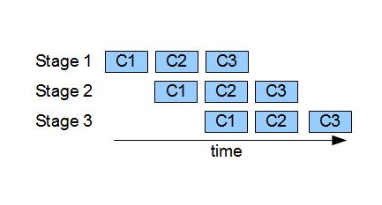
C is a unit of work. First, C(1) will go through stage 1. When it completes, C(2) will go through stage 1, and C(1) moves onto stage 2, and so on..

To express it in high-level programming language, we can think of a stage that just grabs some work unit from the previous stage, perform operations, and output its results in the next stage.

// pseudo-code for a pipeline stage
while(more incoming work unit)
{
      receive work unit from the previous stage
      perform operation on the work unit
      send work unit to the next stage
}

Since I am implementing the pattern in a OO fashion, stage will be expressed as a class. A pipeline, which consists of many stages, will be a class that holds an array of stages.

Finally, since stages communicate with each other by passing data, we need another data structure that supports this behavior.

The author chose to use a Blocking Queue to connect the stages. Each stage will hold an in-queue and out-queue pointer. The in-queue of a stage is the out-queue of the previous stage, and the out-queue of a stage is the in-queue of the next stage. So it is a linked-list of queues.
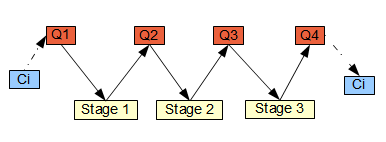
Ci is the work unit to the computed. It will first be inserted to Q1. Stage1's in-queue is Q1, and out-queue is Q2. After stage1 completes its operation, it output the result to Q2. Stage2's in-queue is Q2, and out-queue is Q3. This continues until Ci goes through all stages.

So enough talking, let’s jump straight into the fun stuff.

Blocking Queue

First, we start with the smallest unit, the Blocking Queue. The behavior follow closely to the Java’s implementation.

The Blocking Queue allows two simple operations – Take() and Add(). Take() extracts input data, or blocks until some data is available for a stage. Add() simply adds data to a queue.

// some code and comments are omitted to save space, download the
// source to see the full implementation
template<typename WorkType>
class CBlockingQueue
{
public:
	WorkType Take()
	{
		boost::mutex::scoped_lock guard(m_mutex);
		if(m_deque.empty() == true)
		{
			m_condSpaceAvailable.wait(guard);
		}
		WorkType o = m_deque.back();
		m_deque.pop_back();
		return o;
	}
	bool Add(WorkType const & o)
	{
		boost::mutex::scoped_lock guard(m_mutex);
		if( (m_deque.size() >= m_maxSize) &&
			(NoMaxSizeRestriction!= m_maxSize) )
		{
			return false;
		}
		m_deque.push_front(o);
		m_condSpaceAvailable.notify_one();
		return true;
	}
private:
	boost::uint64_t m_maxSize;
	std::deque<WorkType> m_deque;
	boost::mutex m_mutex;
	boost::condition m_condSpaceAvailable;
};

Pipeline Stage

A pipeline stage holds the in-queue and out-queue. In-queue is where the work unit comes in, and out-queue is where result goes. The Run() function performs three steps that can be customized through inheritance.

// some code and comments are omitted to save space, download the
// source to see the full implementation
template<typename WorkType>
class CPipelineStage
{
public:
	void InitQueues(
		boost::shared_ptr<CBlockingQueue<WorkType> > inQueue,
		boost::shared_ptr<CBlockingQueue<WorkType> > outQueue)
	{
		m_inQueue = inQueue;
		m_outQueue = outQueue;
	}
	void Run()
	{
		FirstStep();
		while(Done() == false)
		{
			Step();
		}
		LastStep();
	}

	virtual void FirstStep() = 0;
	virtual void Step() = 0;
	virtual void LastStep() = 0;

	CBlockingQueue<WorkType> & GetInQueue() const { return *m_inQueue; }
	CBlockingQueue<WorkType> & GetOutQueue() const { return *m_outQueue; }

	bool Done() const { return m_done; }
	void Done(bool val) { m_done = val; }
private:
	bool m_done;
};

Linear Pipeline

The pipeline class allows stages to be added dynamically through AddStage(). Since all the Blocking Queues are owned by the pipeline, each added stage’s in-queue and out-queue will also be initialized through AddStage().

AddWork() allows a work unit to be added to the first stage. The work unit will be processed by all stages, and can be extracted through GetResult().

At last, Start() will simply kick off all stages concurrently by spinning up multiple threads.

// some code and comments are omitted to save space, download the
// source to see the full implementation
template<typename WorkType>
class CLinearPipeline
{
public:
	void AddStage(boost::shared_ptr<CPipelineStage<WorkType> > stage)
	{
		m_stages.push_back(stage);
		size_t numStage = m_stages.size();
		m_queues.resize(numStage+1);

		if(m_queues[numStage-1] == 0)
		{
			m_queues[numStage-1] =
				boost::shared_ptr<CBlockingQueue<WorkType> >(
					new CBlockingQueue<WorkType>()
					);
		}
		m_queues[numStage] =
			boost::shared_ptr<CBlockingQueue<WorkType> >(
				new CBlockingQueue<WorkType>()
				);
		m_stages[numStage-1]->InitQueues(
			m_queues[numStage-1], m_queues[numStage]
			);
	}
	void AddWork(WorkType work)
	{
		m_queues[0]->Add(work);
	}
	WorkType GetResult()
	{
		return m_queues[m_queues.size()-1]->Take();
	}
	void Start()
	{
		for(size_t i=0; i<m_stages.size(); ++i)
		{
			m_threads.push_back(
				boost::shared_ptr<boost::thread>(new boost::thread(
				boost::bind(&CLinearPipeline<WorkType>::StartStage, this, i)
				)));
		}
	}
	void Join()
	{
		for(size_t i=0; i<m_stages.size(); ++i)
		{
			m_threads[i]->join();
		}
	}
private:
	void StartStage(size_t index)
	{
		m_stages[index]->Run();
	}
	std::vector<
		boost::shared_ptr<CPipelineStage<WorkType> >
	> m_stages;
	std::vector<
		boost::shared_ptr<CBlockingQueue<WorkType> >
	> m_queues;
	std::vector<
		boost::shared_ptr<boost::thread>
	> m_threads;
};

Sample Usage

Now that the Blocking Queue, the Stage and the Pipeline are defined, we are ready to make our own pipeline.

As a user of the generic pipeline class, we need to define two things – the work unit, and the stages.

For demostration, I defined the work unit to be a vector of integers, and a stage called AddOneStage, which adds one of all element of the vector.

class CAddOneStage : public CPipelineStage<std::vector<int> >
{
public:
	virtual void FirstStep() { /* omit */ }
	virtual void Step()
	{
		std::vector<int> work = GetInQueue().Take();
		for(size_t i=0; i<work.size(); ++i)
		{
			++work[i];
		}
		GetOutQueue().Add(work);
	}
	virtual void LastStep()	{ /* omit */ };
};

In the program, I will create a pipeline with three AddOneStage. So if I input a vector that goes through the pipeline, the end result would be the input plus three.

int main()
{
	CLinearPipeline<std::vector<int> > pl;

	pl.AddStage(boost::shared_ptr<CAddOneStage>(new CAddOneStage()));
	pl.AddStage(boost::shared_ptr<CAddOneStage>(new CAddOneStage()));
	pl.AddStage(boost::shared_ptr<CAddOneStage>(new CAddOneStage()));

	pl.Start();

	std::vector<int> work(100,0);
	for(size_t i=0; i<10; ++i)
	{
		pl.AddWork(work);
	}
	for(size_t i=0; i<10; ++i)
	{
		std::vector<int> result = pl.GetResult();
		std::cout << result[0] << std::endl;
	}
	pl.Join();
	return 0;
}

Thoughts

CLinearPipeline essentially established a powerful concurrency framework for pipelining. It allows stages will be customized and added easily.

Although the work unit are passed by copy in the example, it can be changed to pointer easily to avoid the copy, nothing more than implementation details.

Problems such as handling protocol stacks can easily leverage this pattern because each layer can be handled independently.

Performance is best when the work among stages are evenly divided. You don’t want a long pole among the stages.

Unfortunately, the maximum amount of concurrency is limited by the number of pipeline stages.

Source

The source can be downloaded here.

Tools

Visual Studio 2008, Boost 1.40.

Reference

Timothy G. Mattson; Beverly A. Sanders; Berna L. Massingill, (2005). Patterns For Parallel Programming. Addison Wesley. ISBN-10: 0321228111

template<typename WorkType>
class CPipelineStage
{
public:
void InitQueues(
boost::shared_ptr<CBlockingQueue<WorkType> > inQueue,
boost::shared_ptr<CBlockingQueue<WorkType> > outQueue)
{
m_inQueue = inQueue;
m_outQueue = outQueue;
}
void Run()
{
FirstStep();
while(Done() == false)
{
Step();
}
LastStep();
}

virtual void FirstStep() = 0;
virtual void Step() = 0;
virtual void LastStep() = 0;

CBlockingQueue<WorkType> & GetInQueue() const { return *m_inQueue; }
CBlockingQueue<WorkType> & GetOutQueue() const { return *m_outQueue; }

bool Done() const { return m_done; }
void Done(bool val) { m_done = val; }
private:
bool m_done;
};
Memory Alignment Problems

Memory alignment is the way data types are arranged and accessed in memory. There are numerous tutorial on the internet that covers the topic in depth. This is not one of them. This is just a post that gathers my thoughts on how little I knew about the topic. 🙂

I’ve read Write Portable Code awhile ago, and there are some recommended practices that I follow to avoid alignment issues. Along the lines of the recommended practices is to avoid using memory overlay and bit-fields.

By avoiding those features, I don’t deal with memory alignment issues too often. But at the same time, I also avoided understanding those memory alignment issues in the first place.

In the past several weeks, I have worked with low level programmer that uses those features. After working with alignment bugs that we have encountered, I feel like I need to take Programming 101 again.

Bus Error on Solaris

My co-worker was developing a cross-platform software in C that receives and routes data from the software I developed(vague on purpose). We integrated our code, and they worked fine under the Linux system. Then he ported the code over to the Solaris machine, it quickly gave him a “Bus Error”.

// code has been drastically simplified for demonstration purposes

// some byte array
char p[5000];

//...many lines later

// extract a 4 byte integer from the buffer, and get a Bus Error from Solaris
int *intData= (int *) ((char *)&p);
int fourByteInteger = *intData;

It smells like an alignment issue. By de-referencing of variable intData, it probably caused a misaligned memory access. We didn’t know the exact detail, but my co-worker changed it to memcpy (one of the recommended practice from Writing Portable Code), and everything is happy.

So it is an alignment issue. But this leaves a bigger question, why does it work on the Linux system?

Unaligned Memory Access on Intel Architecture

The Linux system uses an Intel processor, and the Solaris system uses a SPARC processor.

Turns out that Intel Architecture allows unaligned memory access, with a small performance penalty. I’ve been sheltered under the Intel Architecture for so long that I took unaligned memory access “feature” for granted.

So this leads to another question, how much is the penalty, and how to detect unaligned memory access?

Finding out the penalty isn’t a difficult task. You can force an unaligned access by upconverting a byte pointer into a pointer of a larger type. Here is some pseudo-code.

// loop through the entire array by assuming that the void
// pointer is of type T
template<typename T>
void LoopThroughData( void *data, uint32_t size )
{
	T *dataT = (T*) data;
	T *dataTEnd = dataT + size/sizeof(T);

	while( dataT != dataTEnd )
	{
		(*dataT)*=2;
		dataT++;
	}
}
...
char buffer[2000];
char *bufferWithOffset = buffer + someOffset;
// loop through the array by assuming that it is an integer array
LoopThroughData<int>((void *)bufferWithOffset, 2000);

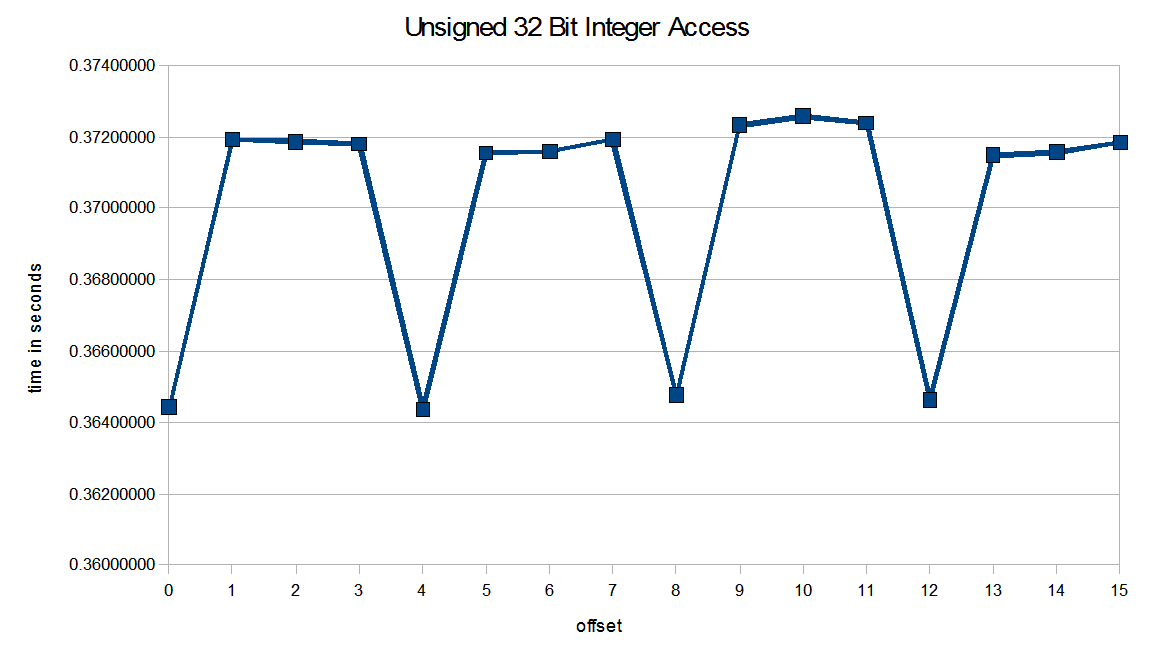
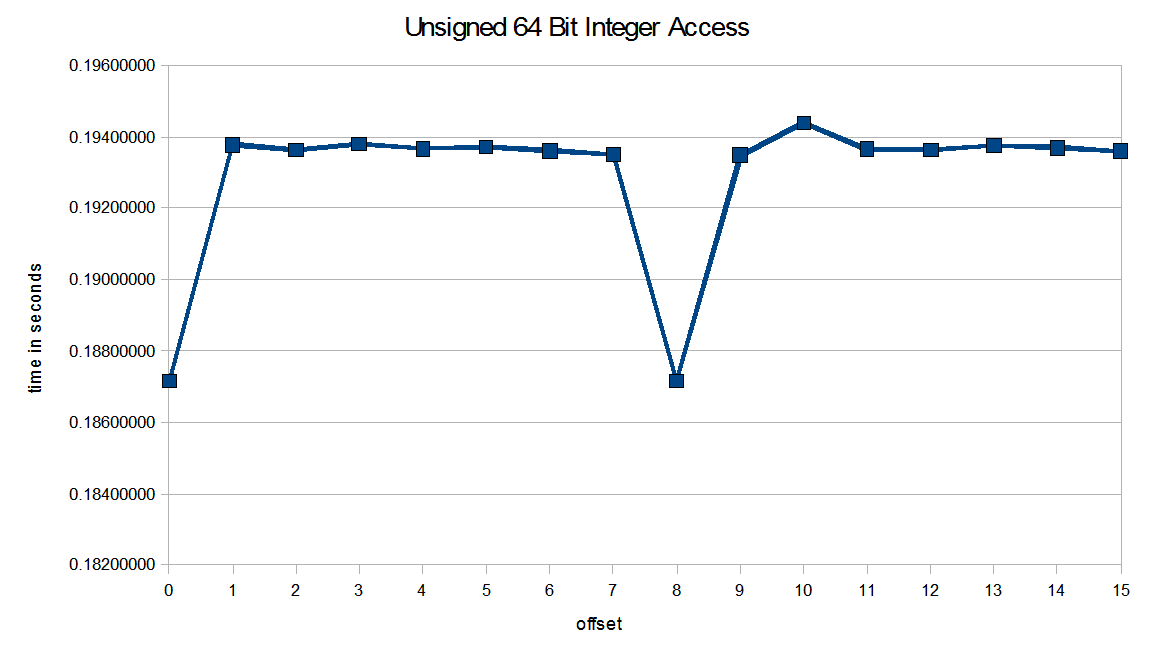
Here’s some plots that shows the penalty of unaligned access in Intel architecture.

Convert a byte array with 32 bit integer array with different offset values.

Convert a byte array with 64 bit integer array with different offset values.

The plot shows that there is a 2% performance penalty on unaligned 32 bit integer access and 3.6% performance penalty on unaligned 64 bit integer access.
I am using an Intel I5-750 processor. The penalty ratio is likely to be different across the Intel processor family.

Defense Against Unaligned Memory Access

Regardless of architecture, we should avoid unaligned memory access. Say that you can’t use memcpy for some performance reason, there is a compiler specific macro that can help detect unaligned memory.

In Visual Studio, there is __alignof that returns the alignment requirement of a given type. In GCC, the equivalent routine is__alignof__. With this tool, I wrote a small C++ routine that will determine whether a given pointer meet its alignment requirement.

template <typename T>
bool CheckIfDataIsAligned(T *p)
{
	if(((uintptr_t)p % __alignof(T)) == 0)
	{
		return true;
	}
	return false;
}

If your compiler does not support any variant of alignof, there is a clever solution that implement it in terms of through offsetof.

Bit-field Padding Problem

Another problem I encountered recently is data structure padding. My co-worker defined a bitfield to extract message from devices.

// code simplified for demonstration purposes.
// method 1
struct BitFields
{
	uint32_t a : 16;
	uint32_t b : 16;
	uint8_t c;
	uint8_t d;
};
// method 2
struct BitFields2
{
	uint16_t a;
	uint16_t b;
	uint8_t c;
	uint8_t d;
};

I am simplifying the code here. The story is a bit more complicated. There are many messages defined, and he is using the size of the messages to determine the offset to read from a large buffer. He found out that if he uses method 1 for his bit-fields, things are completely out of sync. If he uses method 2, everything works.

If you run the sizeof() operator on both object, object defined with method 1 will be bigger than method 2. This is because compiler have the tendency to align a structure to the nearest multiple of the largest member alignment value. So in the case of method 1, the largest method is uint32_t, and causes a 2 byte padding at the end of the structure.

Defense Against Bit-field Padding

Regardless of how much understanding I have on bit-fields, mistakes can always be made. I came up with two personal guideline to follow next time I define a bit-field.

1. Use unnamed bit-field if padding is intended.

2. Use Static Assert to validate structure sizes to prevent unaware paddings.

struct BitFields
{
	uint32_t a : 16;
	uint32_t b : 16;
	uint8_t c;
	uint8_t d;
	uint8_t : 8; // use unnamed bit-field if it is intentional
	uint8_t : 8; // use unnamed bit-field if it is intentional
};
// static assertion to guard against unaware padding
BOOST_STATIC_ASSERT(sizeof(BitFields) == 8);

struct BitFields2
{
	uint16_t a;
	uint16_t b;
	uint8_t c;
	uint8_t d;
};
// static assertion to guard against unaware padding
BOOST_STATIC_ASSERT(sizeof(BitFields) == 6);

On a side note, I know that #pragma pack(n) can also remove padding. But #pragma pack(n) only gives programmer partial control over a structure’s alignment. Compiler can still choose to align object less than n if n is greater than 1.

Source

The source and spreadsheet can downloaded here.

Compiler: Visual Studio 2008

Machine Specification: Intel I5-750, Window 7 64 Bit.

STL String Crashes When HID = 0

Awhile ago, we upgraded our compiler to VC90 (Visual Studio 2008), we found out that Has Iterator Debugging (HID) and Secure SCL in VC9.0 were severely degrading our product’s performance. So we took the time to rebuild everything by disabling those features.

This is done by defining preprocessor macros _SECURE_SCL = 0 and _HAS_ITERATOR_DEBUGGING = 0.

Soon after, we experienced some strange crashes in Debug build that makes no sense to us.

Crashes at std::_Container_base_secure::_Orphan_all()

Here’s one found by my co-worker. [Note: The code was simplified for demonstration purposes]

#define _HAS_ITERATOR_DEBUGGING 0 //turn off Has Iterator Debugging
#include <string>
#include <algorithm>
using namespace std;
int main()
{
	string abc = "abc";

	// Method 1: Crashes upon exit with an access violation
	string dot_abc = "." + abc;

	// Method 2: Works
	//string dot_abc = string(".") + abc;

	string buffer = ".abc";

	// Works without the search call here
	search(buffer.begin(), buffer.end(), dot_abc.begin(), dot_abc.end());

	return 0;
}

If you choose Method 1, you will get an access violation upon the destruction of the string class.

msvcp90d.dll!std::_Container_base_secure::_Orphan_all()  Line 223 + 0x5 bytes    C++
msvcp90d.dll!std::_Container_base_secure::~_Container_base_secure()  Line 115    C++
msvcp90d.dll!std::_String_base::~_String_base()  + 0x11 bytes    C++
msvcp90d.dll!std::_String_val<unsigned short, std::allocator<unsigned short> >::~_String_val<unsigned short,std::allocator<unsigned short> >()  + 0x11 bytes    C++
msvcp90d.dll!std::basic_string<char, std::char_traits<char>,std::allocator<char> >::~basic_string<char,std::char_traits<char>,std::allocator<char> >()  Line 917 + 0xf bytes    C++

However, if you choose Method 2, it will exit gracefully. And both method works under Release build.

The first alarming thing from the call stack is the fact that we are calling into msvcp90d.dll. Strings, unlike other STL containers, is separately compiled into another DLL since VC80.

Remember, to turn off HID and Secure SCL, it is required that all binaries linked by a translation unit to have the same HID and Secure SCL settings. After some online search, it is clear that msvcp90d.dll is built with HID = 1.

Yikes! Since we can’t build msvcp90d.dll, there isn’t much we can do. But Microsoft isn’t stupid, they clearly have worked around some of the problems because Method 2 does work.

Stepping In std::string

In C++, the devil is in the details. Method 1 and Method 2 appears to be functionally equvialent, they are vastly different underneath.

// Method 1
string dot_abc = "." + abc;

At a glance, Method 1 should invoke the operator+ with const char * as the left argument, and std::string as the right argument. After stepping into the function call, it calls into an operator+ in that constructs a basic_string object.

//string L27 operator +(const char *, std::string)
template<class _Elem,
	class _Traits,
	class _Alloc> inline
	basic_string<_Elem, _Traits, _Alloc> __CLRCALL_OR_CDECL operator+(
		const _Elem *_Left,
		const basic_string<_Elem, _Traits, _Alloc>& _Right)
	{	// return NTCS + string
	return (basic_string<_Elem, _Traits, _Alloc>(_Left) += _Right);
	}

It calls a copy constructor that takes in _Left (which is “.”) in this case, and performs operator+= with _Right (which is std::string abc).

// xstring L661 cctor(const char*)
__CLR_OR_THIS_CALL basic_string(const _Elem *_Ptr)
	: _Mybase()
	{	// construct from [_Ptr, <null>)
	_Tidy();
	assign(_Ptr);
	}

In method 2, the operation is different. First, a copy constructor is invoked to create a temp string.

// xstring L798 cctor(const char *)
__CLR_OR_THIS_CALL basic_string(const _Elem *_Ptr, _NO_DEBUG_PLACEHOLDER)
	: _Mybase()
	{	// construct from [_Ptr, <null>)
	this->_Myfirstiter = _IGNORE_MYITERLIST;
	_Tidy();
	assign(_Ptr);
	}

Then it will invoke operator+ with std::string as the left and right argument.

// string L17 operator +(std::string const &, std::string const &)
template<class _Elem,
	class _Traits,
	class _Alloc> inline
	basic_string<_Elem, _Traits, _Alloc> __CLRCALL_OR_CDECL operator+(
		const basic_string<_Elem, _Traits, _Alloc>& _Left,
		const basic_string<_Elem, _Traits, _Alloc>& _Right)
	{	// return string + string
	return (basic_string<_Elem, _Traits, _Alloc>(_Left) += _Right);
	}

Notice anything strange?

For the operation where “.” is copied into a std::string, the copy constructor invoked by Method 1 and Method 2 are different! In method 2, it has a different signature, and there is an extra line in the copy constructor – this->_Myfirstiter = _IGNORE_MYITERLIST.

This is probably one of Visual Studio’s work around to allow programs compiled with HID=0 to safely invoke the std::string library in msvcp90d.dll. Unfortunately, there are loop holes in their patch that fails in Method 1.

Conclusion

If you want to turn off HID and Secure SCL for performance reason, be careful with the string library. There are quite a few bugs in VC9.0 that crashes on perfectly legal C++ code. The example above is one of several scenarios that we’ve found. We have also seen similar crashes on certain usage of stringstream.

On a side note, a co-worker of mine filed this bug in Microsoft Connect. They closed the bug shortly, and told him that it has been fixed in VC10 Beta 2. Basically, they are suggesting that we should upgrade our compiler to a beta version, and pay them more money when it officially comes out. Great customer support, M$.

STL Performance Comparison: VC71, VC90, and STLport

A Programmer’s Hunch

The product I work on has been migrated from VC71 to VC90. Ever since the upgrade, I feel that the software is taking longer to start up, has become less responsive. I have been working on the software for several years, so I have certain performance expectations . My programmer’s hunch tells me that something just isn’t right.

I did some searches, and found out that Checked Iterator (Secure SCL) for STL has been turned on since VC80. It is enabled by default for Debug and Release build. There are numerous performance complains for VC80 STL implementation. Our product relies extensively on STL, so that could certainly be a contributing factor to the sluggishness.

Time to Test

To see the current state of the system, I wanted to see the performance between VC71 and VC90 with Checked Iterator. I also wanted the difference without Checked Iterator. Lastly, I threw in STLport into the pot, just because I found a blog that says it is the fastest.

Four-Way Comparison

In the test, I chose four commonly used containers in our software – vector, string, map and deque. For each container type, it will be run against two types of test – Iteration and Size. For the iteration test, the container will be benchmarked with a fixed size across a large number of iterations. For the size test, the size of the container grows while the number of iteration remains the same.

Comparison – Vector

The test for vector involves three operations – inseration, iterator traversal, and copy.

Vector Size Test (Iteration = 100000)

VC90 with Checked Iterator runs much slower.

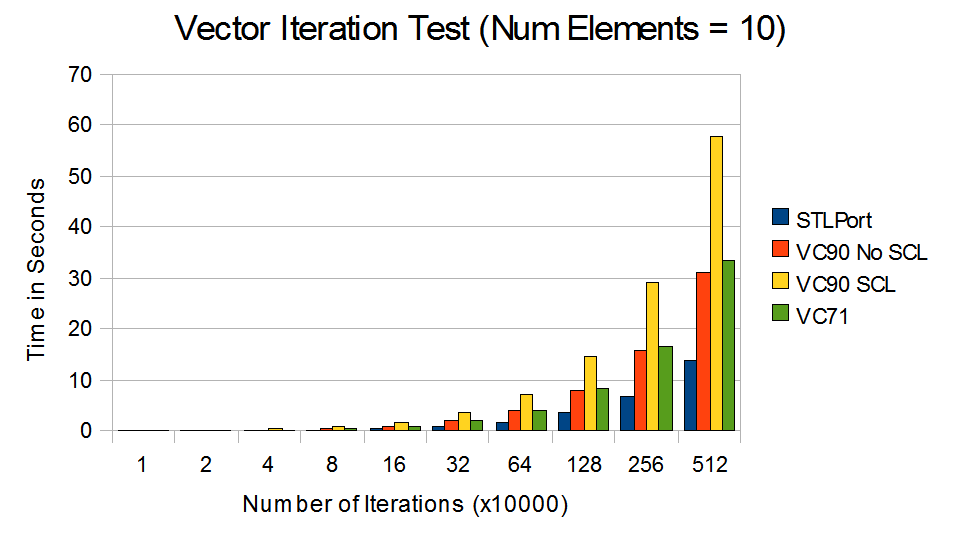
Vector Iteration Test (Num Elements = 10)

Without Checked Iterator, much of the lost performance are regained.

From VC71 to VC90 with SCL, there are 70% – 100% decrease in performance. By turning off Checked Iterator, the performance of VC90 is roughly equivalent to VC71. STLport outperforms all versions of Visual Studio.

Comparison – String

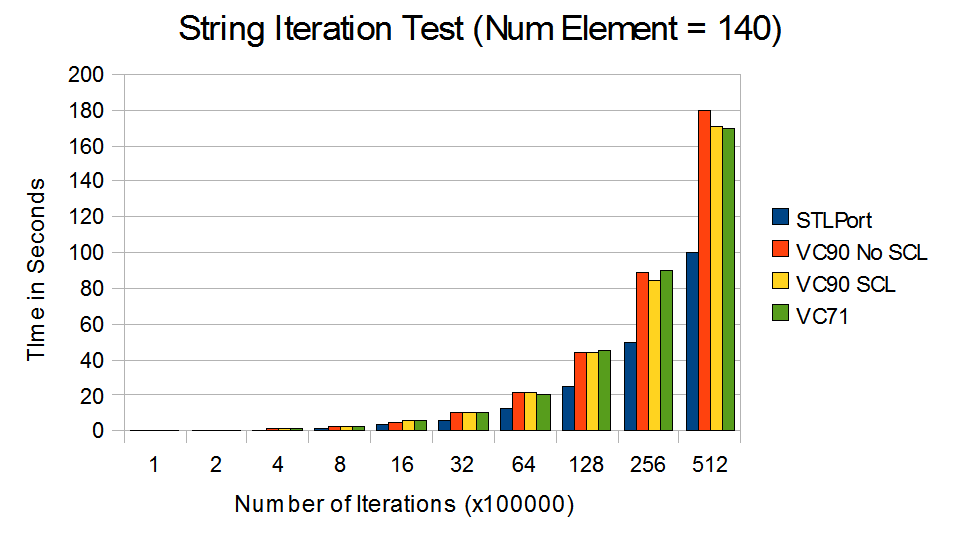
The test for string involves three operations – string copy, substring search, and concatenation.

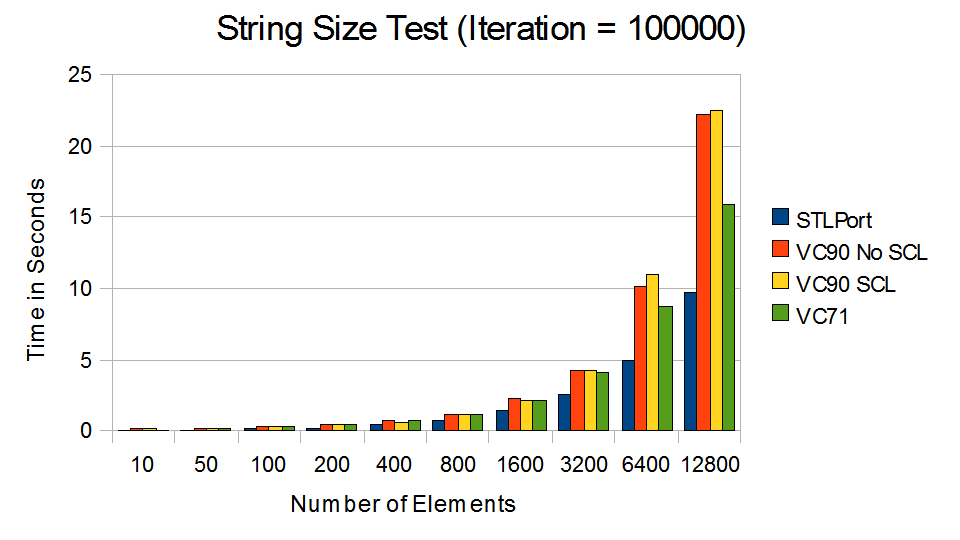
string_size_small

VC90 performed poorly compare to VC71, regardless of Checked Iterators.

string_iter_small

STLport smoked its competitions in the short string test. (Note: 140 is the maximum character in a Twitter post)

Performance of string in VC90 degrades rapidly as the string grows. It appears that the Checked Iterator feature does not impact the performance of string.[Update: Secure SCL and HID was not turned off in string.  See article.] Again, STLport outperforms all version of Visual Studios. This is likely because of the optimization from Short String Optimization and Template Expression for string concatenation.

Comparison – Map

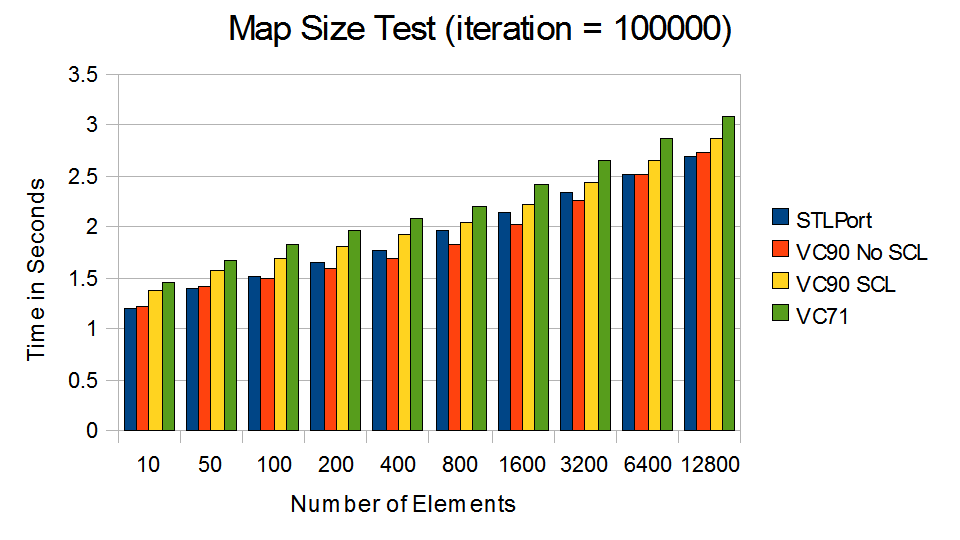
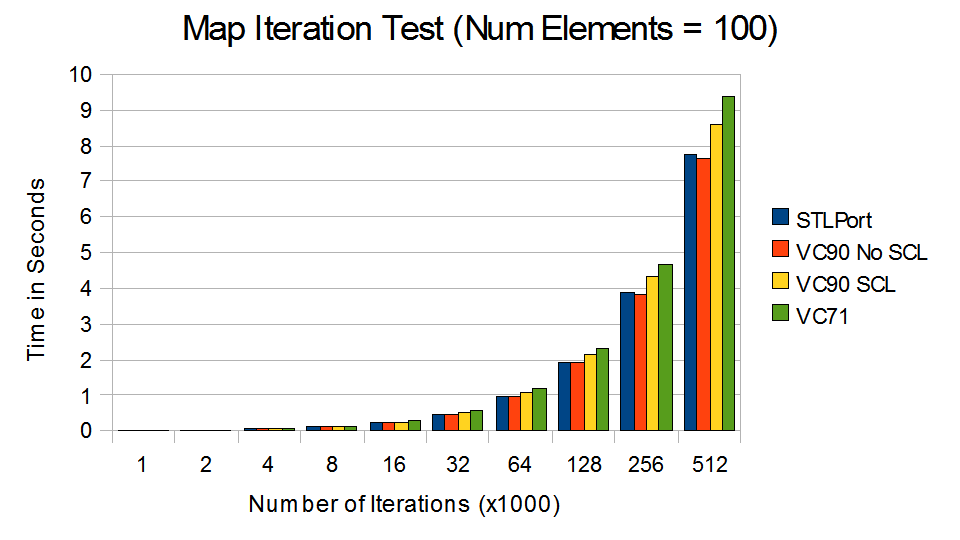
The test for map involves insertion, search, and deletion.

map_size_small

Minor improvement in VC9 compare to VC71.

map_iter_small

VC90 without Checked Iterator came out slightly ahead.

Surprisingly, the performance came out roughly the same for all, with VC71 to be the slowest.

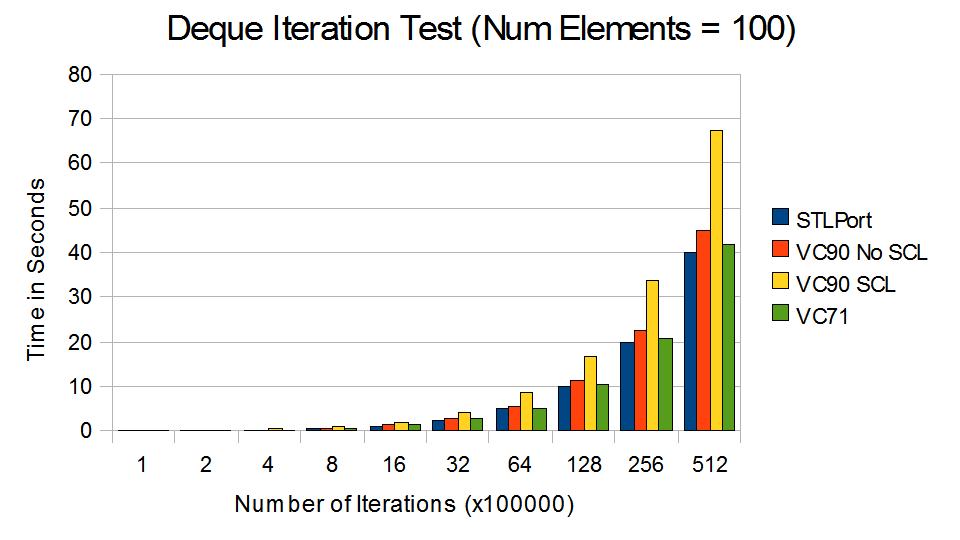
Comparison – Deque

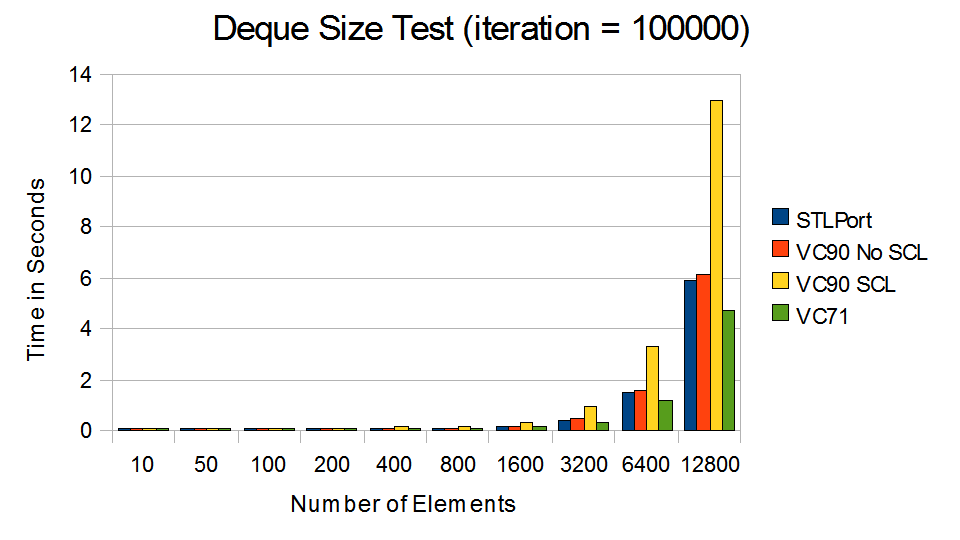
The test for Deque comes with a twist. The deque is implemented is as a priority queue through make_heap(), push_heap() and pop_heap(). Random items are inserted and removed from the queue upon each iteration.

deque_size_small

As the deque grows, VC90 with Checked Iterator runs at snail pace.

deque_iter_small

VC71 and STLport came out fastest.

The performance for VC90 with Checked Iterator is quite disappointing compare to others.

So.. Now What?

VC90 with Checked Iterator is indeed very slow. Although I see the benefit of iterator validation during debug phase, I fail to understand why it is enabled in release build. I am not convinced by the argument of correctness over performance. Once the iterators are proven correct, Checked Iterator is simply a burden. When the software is in customers’ hand, all these validations are pointless.

On a side note, the string and vector performance of STLport is very impressive. It is more 2x faster than Visual Studio. It’s simply amazing.

Source

The source and the results can be downloaded here.

Tools: Visual Studio 2003, Visual Studio 2008, STLport 5.2.1 (with Visual Studio 2008)

Machine Specification: Core Duo T2300 1.66 GHz with 2GB of RAM. Window XP SP3.