Choppy GStreamer

Couple weeks ago, I was trying to enhance an application with GStreamer to stream live audio (8k sample rate Alaw and 16-bit PCM) over UDP.

GStreamer’s pipeline framework is extremely powerful, and it is also poorly documented. I was able to get GStreamer to read from an UDPSrc without much effort, but the audio playback was choppy and would stop playing after a minute.

The choppy playback did not occur when the source was from a hard drive. So I concluded that the audio decoder in GStreamer was susceptible to bursty nature of the audio stream, and some buffering mechanism is necessary to ensure a smooth data rate.

Searching around the GStreamer developer forum, I found few poor souls posted similar issues with no solution.

So after several days of trial and error, I worked out a combo that solved my problem.

Lots of Queues

Disclaimer: I am a n00b with GStreamer, so my solution may be wrong or sub-optimal.

Here’s my GStreamer pipeline for 16 bit PCM audio at 8ksps streaming through port 50379 over UDP.

gst-launch.exe -v udpsrc port=50379 ! queue leaky=downstream max-size-buffers=10 ! audio/x-raw-int, rate=(int)8000, channels=(int)1 ! queue leaky=downstream max-size-buffers=10 ! audiorate ! queue leaky=downstream max-size-buffers=10 ! audiopanorama panorama=0.00 ! queue leaky=downstream max-size-buffers=10 ! autoaudiosink

For Alaw audio, the command is the following.

gst-launch.exe -v udpsrc port=50379 ! queue leaky=downstream max-size-buffers=10 ! audio/x-alaw, rate=(int)8000, channels=(int)1 ! alawdec ! queue leaky=downstream max-size-buffers=10 ! audiorate ! queue leaky=downstream max-size-buffers=10 ! audiopanorama panorama=0.00 ! queue leaky=downstream max-size-buffers=10 ! autoaudiosink

Result

As you can see, I am using queue to smooth out every pipeline level.

In addition to that, I am also buffering audio in my application and smooth out the UDP packet rate with a Windows Multimedia Timers.

So the sender (my application) and receiver (GStreamer) are both buffering to ensure the smoothest data rate.

The result is excellent. The many layers of queuing allows a (fairly) high tolerance of bursting data. I am keeping this setup for now until I find something better.
 

IOCP Server Library

So I wrote C++ library that provides a scalable TCP server using Windows I/O Completion Port (IOCP).

Couple weeks ago, I started studying IOCP to improve the scalability of a C++ application that may handle thousands of TCP/IP data stream.

It didn’t take long for me to realize why IOCP has the reputation of being difficult to learn. IOCP tutorial online usually fall into the category of difficult to read, overly simplified, or just plain wrong.

Worse yet, Winsock2 contains a mix of confusing APIs that perform very similar functions with subtle differences. I spent a few days just to decide whether I should use WSAAccept, accept or AcceptEx to accept a connection.

Eventually, I stumbled onto two books that helped me out a great deal – Windows Via C++ and Network Programming For Windows.

The Library

The library interface is rather simple. It follows the Proactor design pattern where user supplies a completion handler and event notifications flow through the completion handler asynchronously.

Everyone uses echo server as tutorial. So what the heck, here’s mine. πŸ™‚

class CEchoHandler : public CIocpHandler
{
public:
	virtual void OnReceiveData(
        uint64_t clientId,
        std::vector<uint8_t> const &data)
	{
        // echo data back directly to the connected client
		std::vector<uint8_t> d(data);
		GetIocpServer().Send(clientId, d);
	}
}
void main()
{
    // create a handler that echos data back
	boost::shared_ptr h(new CEchoHandler());
    try
    {
        // bind to port 50000 with the server
        CIocpServer *echoServer = new CIocpServer(50000,h);

        char c;
        std::cin >> c; // enter a key to exit

        delete echoServer;
    }
    // RAII constructor that throws different exceptions upon failure
    catch(...)
    {
    }
}

[10/27/2010 10:34AM EST]
Update: Moved “delete echoServer;” to within the try block per co-worker’s suggestion.

Focus

Of course, there are more to the IOCP server than the code snippet above.

Here are my area of focus when designing the library.

  1. Scalability – By ensuring that there are minimum number of critical section in the library.
  2. TCP Graceful shutdown – Allow user to perform TCP graceful shutdown and simplify the TCP half-closed state.
  3. RAII – A WYSIWYG constructor and a lenient destructor that allows you to do ungraceful shutdown.

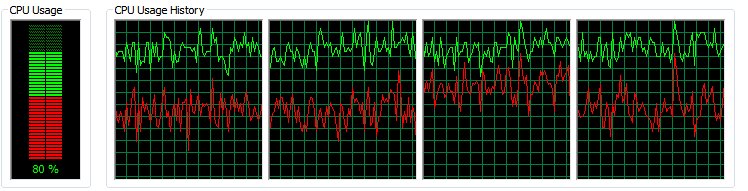
Here is a screenshot of the CPU utilization of the echo server at 300 concurrent loopback file transfer.

IOCP Server scalability upon Intel I5-750 (quad-core)


License

IOCPServer is released under the Boost Software License 1.0.

Download

For latest version, please see the Projects page.

IOCPServer is tested under the following configurations.

OS: Window XP, Window 7.

Compiler: Visual Studio 2009 with Boost 1.40

Build Type: ANSI, Unicode.

Enforce Alignment to Avoid False Sharing

I have been working on a C++ TCP server that utilizes Windows IO Completion Ports. So far, the toughest challenge has been maintaining the scalability of the server. Among all the concurrency problems, the one I absolutely try to avoid is false sharing, where one CPU modifies a piece of data that invalidates another CPU’s cache line.

The symptom of false sharing is extremely difficult to detect. As preventive measure, I grouped all shared data carefully into a single object so I can easily visualize the potential contentions. And I add padding accordingly if I think contention exists.

Then I came across a chapter in Windows Via C/C++, it provided a cleaner solution.

Just align them to different cache line

My TCP server follows the proactor pattern, so I have a I/O thread pool to handle send and receive requests and dispatch events. Naturally, the threads have some piece of data that they share in read, write or both.

Here’s just a dummy example.

class CSharedData
{
public:
	CSharedData() : data1(0), data2(0), data3(0) {}
	unsigned int data1; // read write
	unsigned int data2; // read write
	unsigned int data3; // read write
};

Since my processor’s cache line is 64 bytes, the data structure above is definitely going to cause contention,Β  say data1 is updated by one thread, and data2 is read by another. To solve this, just simply force every read write data member to be in different cache line through __declspec(align(#)).

class __declspec(align(64)) CSharedData
{
public:
	CSharedData() : data1(0), data2(0), data3(0) {}
	__declspec(align(64))
		unsigned int data1;
	__declspec(align(64))
		unsigned int data2;
	__declspec(align(64))
		unsigned int data3;
};

Thoughts

With __declspec(align(#)), you can even specify the alignment of the data structure itself. This is very useful for putting shared objects in containers like std::vector. See Okef’s std::vector of Aligned Elements for why this is a bad idea.

It would be nice if the alignment can be changed at runtime base on processor spec. I know it doesn’t make sense technically, but it is on my wishlist. πŸ™‚

Shallow Constness

Once awhile, I see programmers who are new to C++ frustrated by the use of the const qualifiers on member functions. These frustrations usually reduce to the following example.

struct X { int i; };
class Y
{
public:
	Y() { m2 = &m1; } // m2 points to m1
	X *M1() const { return &m1; } // This won't compile.
	X *M2() const { return m2; }  // This does.
private:
	X m1;
	X *m2;
};

When it comes to this, there are two camps of programmers.

  1. C++ is so inconsistent! M2() is fine, but why won’t M1() compile? I am clearly not modifying m1.
  2. C++ is so inconsistent! M1() is fine, but why would M2() compile? This is clearly a constness loophole because people can modify the content of m2.

Believe it or not, C++ is actually very consistent. It is just not very intuitive.

The “this” Pointer

The behavior can be traced back to the this pointer, and the side effects of the const qualifier on the member function.

In the C++ standard section 9.3.2.1

… If a member function is declared const, the type of this is T const*, if the member function is declared volatile, the type of this is T volatile *, and if the member function is declared const volatile, the type of this isΒ  T const volatile *.

So in the example, the this pointer has type Y const *, which reads pointer to a const Y object.

Expand for Details

Now that we know the type of the this pointer, we can expand M1() and M2().

Let’s start with M1(). Since the this pointer is of type Y const *, this->m1 will inherit the const qualifier, and is of type X const.

X *M1() const
{
   // this has type Y const * ;
   X const tmp = this->m1; // this->m1 has type X const;
   X const *tmpAddr = &tmp;// &this->m1 has type X const *;
   X *tmp2 = tmpAddr;      // Can't compile! Can't copy X const * to X *.
   return &tmp2;
}

In line 6, the compiler fails to copy X const * to X *. In other words, the compiler can’t convert a “pointer to a const X” to a “pointer to X”. This is consistent with the definition of the const qualifier. Hence, M1 fails to compile.

For M2(), we can expand the function in a similar way.

X *M2() const
{
   // this has type Y const * ;
   X *tmp = this->m2; // this->m2 has type X * const;
   return tmp;
}

Unlike M1, it is perfectly legal to convert X * const to X*.Β  In other words, the compiler can copy a “const pointer to X” to a “pointer to X”. This is also consistent with the definition of the const qualifier.

But That’s Not The Point

Unfortunately, the answer above rarely satisfies the frustrated programmers. They are trying to follow the guidelines of const-correctness, and this behavior, although consistent, is ambiguous and makes no sense.

So here’s my recommendation – program defensively.

If you are going to return a member variable pointer (including smart ptr) or reference in a member function, never apply the const qualifier to the member function. Since C++ constness is shallow, the const qualifier only provides a false sense of security.Β  By assuming the worst, it will always be consistent and intuitive.

How to Handle CAsyncSocket::OnClose Gracefully

In the past three weeks, I have been working on an old MFC application on my own time. The application uses CAsyncSocket to handles several hundred TCP data streams with somewhat high data rate. As much as I find MFC painful to work with, CAsyncSocket is not hard to use, and it fits in well with the MFC messaging framework.

I wrote all my automated testing in a small Python script to simulate the data streams. To my surprise, I found that the MFC application is missing data packets. Precisely, it is missing the last couple kilobytes of the stream.

I suspected that it is a TCP graceful shutdown issue (probably similar to the one with PuTTY). Very likely it has something to do with the OnClose() callback.

The MFC application treated the OnClose() callback as a graceful shutdown event after all packets are received. This might not be the correct assumption.

// Original implementation of the OnClose() function in the MFC app
// This implementation is leaking several kB of data.
void CMyAppAsyncSocket::OnClose(int nErrorCode)
{
	// ... do some app close stuff

	// Call the base class Close
	CAsyncSocket::OnClose(nErrorCode);
}

When Exactly Is CAsyncSocket::OnClose Called?

In MSDN, the CAsyncSocket::OnClose is described as the following:

Called by the framework to notify this socket that the connected socket is closed by its process.

This tells me nothing. There are tutorials on how OnReceive and OnSend should be written, but there is nothing for OnClose.

To find out what triggers the OnClose callback, I looked into the implementation of the CAsyncSocket.

In summary, it is nothing but a simple overlapped asynchronous I/O wrapper on WinSock API. And the OnClose function is invoked by the FD_CLOSE event from WSAGETSELECTEVENT.

[Update: CAsyncSocket does not use overlapped I/O. I misread the documentation, and my co-worker corrected me.]

// sockcore.cpp
void PASCAL CAsyncSocket::DoCallBack(WPARAM wParam, LPARAM lParam)
{
    // ... more code here
	switch (WSAGETSELECTEVENT(lParam))
	{
    // ... more cases here
	case FD_CLOSE:
		pSocket->OnClose(nErrorCode);
		break;
	}
}

Ah ha, I know FD_CLOSE fairly well. The Winsock graceful shutdown sequence is well described by MSDN.

(2) Receives FD_CLOSE, indicating graceful shutdown in progress and that all data has been received.

Upon FD_CLOSE, I am supposed to read all the remaining data from the socket. So to fix the problem, I modified the OnClose function to read the remaining data packets.

void CMyAppAsyncSocket::OnClose(int nErrorCode)
{
    CAsyncSocket::OnClose(nErrorCode);

	while(1)
	{
		// m_tempBuffer is my internal receive buffer
		int numBytes = Receive(m_tempBuffer, MESSAGE_BUFFER_LENGTH);
		if( (SOCKET_ERROR == numBytes) || (0 == numBytes) )
		{
			break;
		}
        // ... process the remaining data here
	}
    // .. more app close stuff here
}

With this slight modification, I have transferred hundreds of gigabytes of TCP streams without any data loss.

Conclusion

CAsyncsocket is a thin wrapper to the WinSock library.

To find out how to really handle the CAsyncsocket callbacks, it is recommended to look into its implementation to find the corresponding WSAAsyncSelect event.