Warning Level per Header File

A common guideline in best coding practices is to never ignore compiler warnings, and always use the highest warning level possible. For Microsoft C/C++ compilers, this mean level 4 (/W4).

But just because your code compiles cleanly under level 4, it doesn’t mean external libraries would too.

Let’s take Boost library as an example. It is arguably the most well written C++ library in the world. Yet it is not cleared of level 4 warning until 1.40.

The truth is that level 4 warning level is harsh (and often silly), and some code are just not fit to make the cut.

Use L3 for the Uglies

For ugly header files that aren’t designed with level 4 warning in mind, just compile them with level 3 with the #pragma warning(push,3) command.

Here’s an example.

#pragma warning( push, 3 ) // boost make_shared has L4 warnings, so use L3.
	#include <boost/make_shared.hpp>
#pragma warning(pop) // resume to original warning level (4)

An often suggested alternative is to use #pragma warning(disable:xyz), where xyz is the warning number.
This solution is clumsy because it requires you to find out every single warning emitted from every external header file, and then disable them one at a time. I am too busy (lazy) for that. 🙂

true != true?

A co-worker was struggling with an urgent bug, and came by my office to ask an odd question.

Is it possible for true != true in C++?

Last time I checked, 1 is equal to 1. So I stopped by her cubical to see this magical event.

Is it true?

She told me that the code has been recompiled from scratch, and both debug and release build exhibit the same behavior.

Variable b is initialized to be true, and Visual Studio run-time checks didn’t catch anything strange.

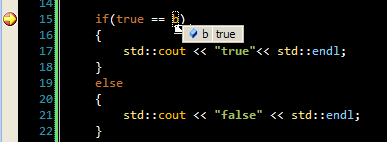
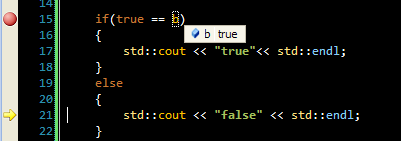
Stepping through the code in Visual Studio 9, here’s what we saw.

Variable b is true, so it should pass the satisfy the first condition.

The first case failed, and went to the false case instead.

Wow, she’s right. This is quite something.

Diving in

C++ is a language well designed to shoot your foot. In the standard, bool is an integral type that may be 1 or more bytes, and can be either true, false or undefined.

Experience tells me that very likely, b is not true. Visual Studio is not displaying the truth.

To show this, just print out the value of b.

std::cout << std::hex << b << std::endl;

prints 0xcd

Ah ha, so b is an uninitialized variable, and falls under the category of “undefined” in the standard.

Code

Visual Studio does have runtime checks against accessing uninitialized variables, but it can be easily fooled.

Runtime check fails below for VC 8, 9, and 10.

<pre>#include <iostream>

struct SBool {	bool b; };
SBool GetBool()
{
	SBool s;
	return s;
}
int main()
{
	bool b = GetBool().b;
	if(true == b)
	{
		std::cout << "true"<< std::endl;
	}
	else
	{
		std::cout << "false" << std::endl;
	}
	std::cout << std::hex << b << std::endl;

	return 0;
}

A PDH Helper Class – CPdhQuery

I have been writing a custom profiling tool for a specific Windows application. Windows has various SDK to access available profiling information. Some of the profiling data are available through straightforward APIs in kernel32.dll (e.g. GetThreadTimes). Others can be collected through the PDH interfaces in pdh.lib.

The documentation on the PDH interface has lots of information, but the sparse sample code makes it difficult to put the whole picture together.

Worse yet, some of the sample code are buggy. For example, the PdhGetFormattedCounterArray example can’t handle a context switch query – “\\Thread(*)\\Context Switches/sec”, and barfs out an error 0xc0000bba.

CPdhQuery

I wrote a class called CPdhQuery to simplify the PDH interface. The constructor takes in a PDH counter path. The design is RAII, and only has one public function called CollectQueryData. You can call it based on your sampling interval. Any PDH failure will result in an exception with a translated message.

#include <windows.h>
#include <pdh.h>
#include <pdhmsg.h>
#include <string>
#include <map>
#include <sstream>
#include <vector>
#include <tchar.h>
#include <iostream>
#pragma comment(lib, "pdh.lib")

namespace std
{
	typedef std::basic_string<TCHAR> tstring;
	typedef std::basic_ostream<TCHAR> tostream;
	typedef std::basic_istream<TCHAR> tistream;
	typedef std::basic_ostringstream<TCHAR> tostringstream;
	typedef std::basic_istringstream<TCHAR> tistringstream;
	typedef std::basic_stringstream<TCHAR> tstringstream;
} // end namespace

#ifdef UNICODE
#define tcout std::wcout
#else
#define tcout std::cout
#endif

class CPdhQuery
{
public:

	// Inner exception class to report error.
	class CException
	{
	public:
		CException(std::tstring const & errorMsg) : m_errorMsg(errorMsg)	{}
		std::tstring What() const { return m_errorMsg; }
	private:
		std::tstring m_errorMsg;
	};

	//! Constructor
	explicit CPdhQuery(std::tstring const &counterPath)
		: m_pdhQuery(NULL)
		, m_pdhStatus(ERROR_SUCCESS)
		, m_pdhCounter(NULL)
		, m_counterPath(counterPath)
	{
		if (m_pdhStatus = PdhOpenQuery(NULL, 0, &m_pdhQuery))
		{
			throw CException(GetErrorString(m_pdhStatus));
		}

		// Specify a counter object with a wildcard for the instance.
		if (m_pdhStatus = PdhAddCounter(
			m_pdhQuery,
			m_counterPath.c_str(),
			0,
			&m_pdhCounter)
			)
		{
			GetErrorString(m_pdhStatus);
			throw CException(GetErrorString(m_pdhStatus));
		}
	}

	//! Destructor. The counter and query handle will be closed.
	~CPdhQuery()
	{
		m_pdhCounter = NULL;
		if (m_pdhQuery)
			PdhCloseQuery(m_pdhQuery);
	}

	//! Collect all the data since the last sampling period.
	std::map<std::tstring, double> CollectQueryData()
	{
		std::map<std::tstring, double> collectedData;

		while(true)
		{
			// Collect the sampling data. This might cause
			// PdhGetFormattedCounterArray to fail because some query type
			// requires two collections (or more?). If such scenario is
			// detected, the while loop will retry.
			if (m_pdhStatus = PdhCollectQueryData(m_pdhQuery))
			{
				throw CException(GetErrorString(m_pdhStatus));
			}

			// Size of the pItems buffer
			DWORD bufferSize= 0;

			// Number of items in the pItems buffer
			DWORD itemCount = 0;

			PDH_FMT_COUNTERVALUE_ITEM *pdhItems = NULL;

			// Call PdhGetFormattedCounterArray once to retrieve the buffer
			// size and item count. As long as the buffer size is zero, this
			// function should return PDH_MORE_DATA with the appropriate
			// buffer size.
			m_pdhStatus = PdhGetFormattedCounterArray(
				m_pdhCounter,
				PDH_FMT_DOUBLE,
				&bufferSize,
				&itemCount,
				pdhItems);

			// If the returned value is nto PDH_MORE_DATA, the function
			// has failed.
			if (PDH_MORE_DATA != m_pdhStatus)
			{
				throw CException(GetErrorString(m_pdhStatus));
			}

			std::vector<unsigned char> buffer(bufferSize);
			pdhItems = (PDH_FMT_COUNTERVALUE_ITEM *)(&buffer[0]);

			m_pdhStatus = PdhGetFormattedCounterArray(
				m_pdhCounter,
				PDH_FMT_DOUBLE,
				&bufferSize,
				&itemCount,
				pdhItems);

			if (ERROR_SUCCESS != m_pdhStatus)
			{
				continue;
			}

			// Everything is good, mine the data.
			for (DWORD i = 0; i < itemCount; i++)
			{
				collectedData.insert(
					std::make_pair(
					std::tstring(pdhItems[i].szName),
					pdhItems[i].FmtValue.doubleValue)
					);
			}

			pdhItems = NULL;
			bufferSize = itemCount = 0;
			break;
		}
		return collectedData;
	}

private:
	//! Helper function that translate the PDH error code into
	//! an useful message.
	std::tstring GetErrorString(PDH_STATUS errorCode)
	{
		HANDLE hPdhLibrary = NULL;
		LPTSTR pMessage = NULL;
		DWORD_PTR pArgs[] = { (DWORD_PTR)m_searchInstance.c_str() };
		std::tstring errorString;

		hPdhLibrary = LoadLibrary(_T("pdh.dll"));
		if (NULL == hPdhLibrary)
		{
			std::tstringstream ss;
			ss
				<< _T("Format message failed with ")
				<< std::hex << GetLastError();
			return ss.str();
		}

		if (!FormatMessage(FORMAT_MESSAGE_FROM_HMODULE |
			FORMAT_MESSAGE_ALLOCATE_BUFFER |
			/*FORMAT_MESSAGE_IGNORE_INSERTS |*/
			FORMAT_MESSAGE_ARGUMENT_ARRAY,
			hPdhLibrary,
			errorCode,
			0,
			(LPTSTR)&pMessage,
			0,
			(va_list*)pArgs))
		{
			std::tstringstream ss;
			ss
				<< m_counterPath
				<< _T(" ")
				<< _T("Format message failed with ")
				<< std::hex
				<< GetLastError()
				<< std::endl;
			errorString = ss.str();
		}
		else
		{
			errorString += m_counterPath;
			errorString += _T(" ");
			errorString += pMessage;
			LocalFree(pMessage);
		}

		return errorString;
	}

private:
	PDH_HQUERY m_pdhQuery;
	PDH_STATUS m_pdhStatus;
	PDH_HCOUNTER m_pdhCounter;
	std::tstring m_searchInstance;
	std::tstring m_counterPath;
};

void DumpMap(std::map<std::tstring, double> const &m)
{
	std::map<std::tstring, double>::const_iterator itr = m.begin();
	while(m.end() != itr)
	{
		tcout << itr->first << " " << itr->second << std::endl;
		++itr;
	}
}

void main()
{
	try
	{
		// uncomment to try different counter paths
		CPdhQuery pdhQuery(
			std::tstring(_T("\\Thread(*)\\Context Switches/sec"))
			//std::tstring(_T("\\Thread(firefox/0)\\Context Switches/sec"))
			//tstring(L"\\Processor(*)\\% Processor Time")
			//tstring(_T("\\Processor(*)\\Interrupts/sec"))
			//tstring(L"\\Processor(_Total)\\Interrupts/sec")
			);
		for(int i=0; i<100; ++i)
		{
			Sleep(1000);
			DumpMap(pdhQuery.CollectQueryData());
		}
	}
	catch (CPdhQuery::CException const &e)
	{
		tcout << e.What() << std::endl;
	}
}

Requirement

Tested on Window 7 x64, Visual Studio 2008 SP1

Build Type: Unicode and ANSI.

IOCP Server 1.1 Released

While stressing a TCP server application, I found a nasty bug with the IOCP server library.

After handling 100,000 connections or so, the TCP server stops accepting connections. The output from TCPView shows that clients are still trying to connect to the server, but the connection was never established.

I was able to verify that all existing connections are unaffected. Therefore, the IO completion port is still functional. So I concluded that it is not a non-page pool issue, and has something to do with the handling of the accept completion status.

The Cause

The bug is simple, but it takes half a day to reproduce. Here’s the code snippet that causes the problem.

void CWorkerThread::HandleAccept( CIocpContext &acceptContext, DWORD bytesTransferred )
{
	// Update the socket option with SO_UPDATE_ACCEPT_CONTEXT so that
	// getpeername will work on the accept socket.
	if(setsockopt(
		acceptContext.m_socket,
		SOL_SOCKET,
		SO_UPDATE_ACCEPT_CONTEXT,
		(char *)&m_iocpData.m_listenSocket,
		sizeof(m_iocpData.m_listenSocket)
		) != 0)
	{
		if(m_iocpData.m_iocpHandler != NULL)
		{
			// This shouldn't happen, but if it does, report the error.
			// Since the connection has not been established, it is not
			// necessary to notify the client to remove any connections.
			m_iocpData.m_iocpHandler->OnServerError(WSAGetLastError());
		}
		return;
	}
	... // more code here
	acceptContext.m_socket = CreateOverlappedSocket();
	if(INVALID_SOCKET != acceptContext.m_socket)
	{
		PostAccept(m_iocpData);
	}
	... // more code here

See that innocent little “return” statement when setsockopt() fails, I foolishly concluded that “This shouldn’t happen”. And naturally, since it should never happen, I never thought about properly handling the error case.

Apparently in the real world, some connections comes and goes so quickly that immediately after accepting the connection, it has already been disconnected. setsockopt() would fail with error 10057, and the return statement causes the “accept chain” to break.

The fix is to remove the “return” statement and move on with life.

Others

Along with this fix, I also removed an unnecessary event per Len Holgate’s suggestion. However, I have not yet removed the mutex in ConnectionManager. This require a slight redesign, and a bit more thoughts.

I can see myself maintaining this library for awhile, so I created a Projects page to host the different versions.

Download

For latest version, please see the Projects page.

Overriding Thread Context

While goofing around with Win32 threads, I bumped into a function called SetThreadContext. The documentation is light. The function is described with one sentence.

Sets the context for the specified thread.

My first thought was “There is no way you can override a thread’s context. That’s just crazy.”.

I was wrong. This function is a hell lot of fun.

The CONTEXT structure

The most interesting part of SetThreadContext is the input argument. It takes a CONTEXT object that is briefly mentioned in MSDN.

The structure, according to the documentation, is tied to specific processor architecture. The actual structure can only be found through WinNT.h.

So digging into WinNT.h, I found the definition of this really cool structure.

typedef struct _CONTEXT {

// ... many things here

    DWORD   Edi;
    DWORD   Esi;
    DWORD   Ebx;
    DWORD   Edx;
    DWORD   Ecx;
    DWORD   Eax;
    DWORD   Ebp;
    DWORD   Eip;

// ... many things here

} CONTEXT;

The CONTEXT data structure contains all the main x86 registers plus other debug registers for a thread. These registers can be changed with a simple function call.

Fun Hacking

Putting my black hat on, what if I …

  1. Spin up a thread, and let it run for a bit.
  2. Hijack its thread context and force it to do something malicious.
  3. When that malicious task is completed, revert its thread context to its original state.
  4. The thread seamlessly recovers its original task, and the hijacker leaves absolutely no trace.

Below is such a program (minus the malicious part). A thread is spun up to calculate pi. Somewhere along the way, its instruction pointer is hijacked to calculate e. When the e is calculated, the thread is restored to calculate pi.

#include <windows.h>
#include <iostream>

// A simple E approximator found online.
double calculateE(int n)
{
    double value = 0;
    double factorial = 1;
    for(int i = 0; i <= n; i++)
    {
        for(int j = 1; j <= i; j++)
        {
            factorial *= j;
        }
        value += 1 / factorial;
        factorial = 1;
    }
    return value;
}

// A simple Pi approximator found online.
double calculatePi()
{
	std::cout << "Calculating Pi" << std::endl;
	double retPi = 0;
	for (LONGLONG denom = 1; denom <= 300000000; denom += 2)
	{
		if ((denom - 1) % 4)
			retPi -= (4.0 / denom);
		else
			retPi += (4.0 / denom);

	}
	return retPi;
}

CONTEXT originalContext; // thread's original context
HANDLE threadHandle;     // handle of the victim thread
volatile int intrusionDone; // global flag to indicate intrusion is completed

void Intrusion()
{
	__asm
	{
		push ebp
		mov ebp,esp
	}
	std::cout << "Running intrusion" << std::endl;
	std::cout << "E is " << calculateE(105) << std::endl;
	std::cout << "Completed intrusion" << std::endl;
	intrusionDone = 1;
	Sleep(1000);

	__asm
	{
		pop ebp
		mov ebp,esp
	}
}

DWORD WINAPI ThreadProc( LPVOID lpParam )
{
	double pi = calculatePi();
	std::cout << "Pi is " << pi << std::endl;
	return 0;
}

int main()
{
	intrusionDone = 0;
	threadHandle = CreateThread(
		NULL,
		0,
		ThreadProc,
		NULL,
		CREATE_SUSPENDED,
		NULL);

	// Let the thread run a little bit, then suspend it.
	ResumeThread(threadHandle);
	Sleep(100);
	SuspendThread(threadHandle);

	// Save the thread's context object
	originalContext.ContextFlags = CONTEXT_ALL;
	GetThreadContext(threadHandle, &originalContext);

	// Get the thread's context object again, but overwrite it this time.
	CONTEXT c;
	ZeroMemory(&c, sizeof(c));
	c.ContextFlags = CONTEXT_ALL;
	GetThreadContext(threadHandle, &c);

	// overwrite the instruction pointer to call Instruction directly.
	c.Eip = reinterpret_cast<DWORD>(Intrusion);

	// Update the thread context, and let it run again
	SetThreadContext(threadHandle, &c);
	ResumeThread(threadHandle);

	// Let it run for a bit and then suspend the thread.
	while(0 == intrusionDone) { Sleep(1); }
	SuspendThread(threadHandle);

	// Now revert the thread to its original context and let it finish its
	// job
	SetThreadContext(threadHandle, &originalContext);
	ResumeThread(threadHandle);

	WaitForSingleObject(threadHandle, INFINITE);

	return 0;
}
Output of the program

	Calculating Pi
	Running intrusion
	E is 2.71828
	Completed intrusion
	Pi is 3.14159

Thoughts

After some internet searches, apparently this technique is part of the method for Dll Injection.

Tools: Visual Studio 2008, Window 7